> ## Documentation Index
> Fetch the complete documentation index at: https://moxn.mintlify.site/llms.txt
> Use this file to discover all available pages before exploring further.
# Databases
> Spreadsheet-like views over documents with typed columns and structured properties
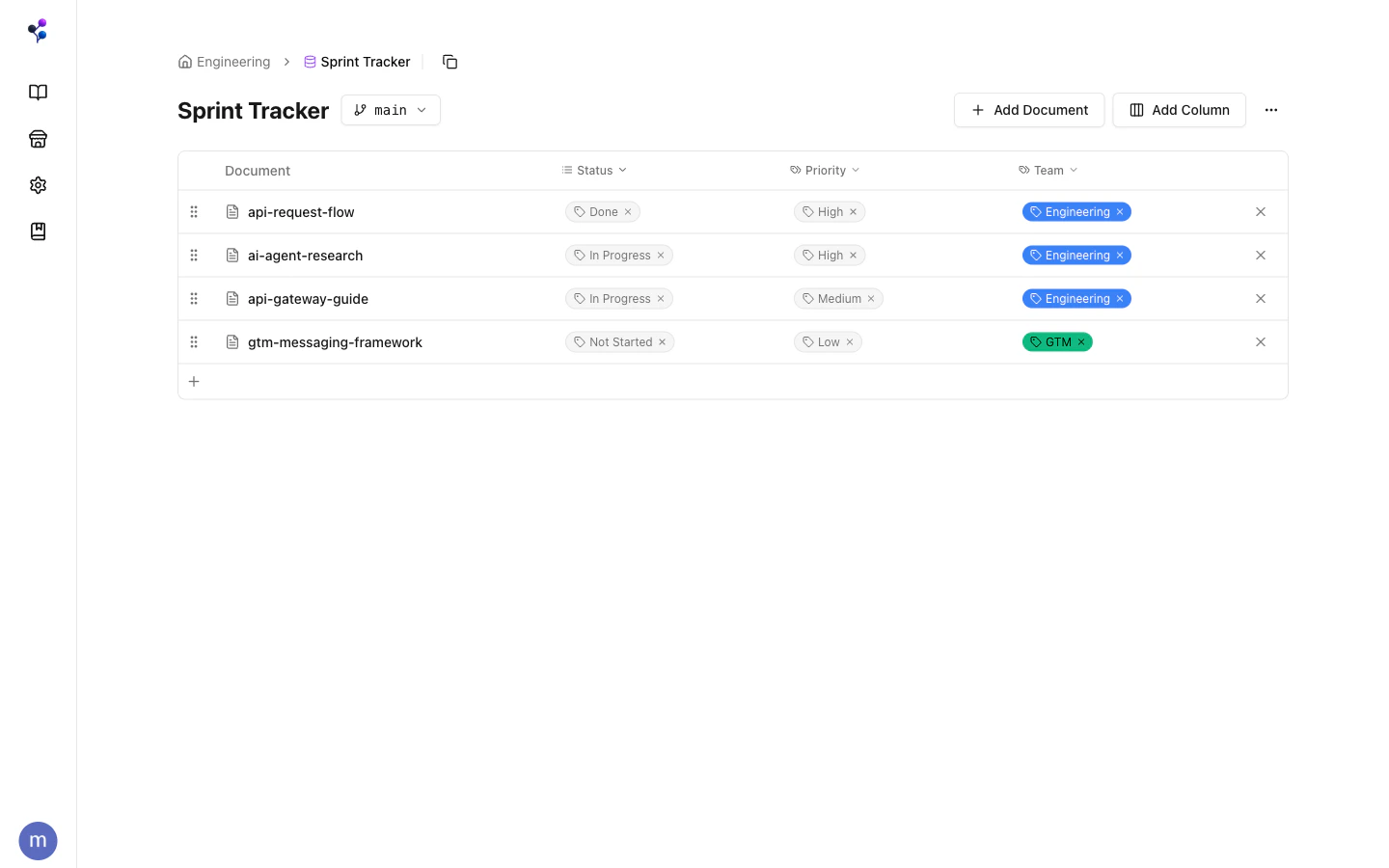
A **database** is a spreadsheet-like view over a set of KB documents. Each row is a document; each column is a typed property. Databases don't store content themselves — they're a lens over documents that already exist in the KB.
 ## The Two Types of Columns
This is the key thing to understand about databases: column types fall into two fundamentally different categories.
### Tag-Backed Columns
`select`, `multi_select`, `status`, and `checkbox` columns store their values as **tags**. Each option in a select column is a tag in the global tag pool. Setting a property value on a document = assigning that tag to the document.
| Column type | Behavior |
| -------------- | ------------------------------------------------------------------------- |
| `select` | Single value — setting replaces the current value |
| `multi_select` | Multiple values — setting adds to existing values |
| `status` | Single value with group metadata (e.g., Not Started / In Progress / Done) |
| `checkbox` | Boolean — backed by auto-created `checked` / `unchecked` tags |
This means tag-backed column values show up in the Tags panel, can be filtered in `find`, and are part of the same unified tag system. A "Status: Approved" column value is the same thing as the `/sprint-tracker/status/approved` tag.
### Scalar Properties
`number`, `date`, `text`, `url`, `email`, and `page_ref` columns store values directly on the document — they're not tags. They don't appear in the tag hierarchy and can't be used as `tagIds` filters.
| Column type | Example value |
| ----------- | ----------------------------------------- |
| `number` | `42`, `3.14` |
| `date` | `"2026-02-14"` (ISO 8601) |
| `text` | `"See Notion for context"` |
| `url` | `"https://github.com/org/repo/issues/42"` |
| `email` | `"eng@example.com"` |
| `page_ref` | Link to another document UUID |
## Creating a Database
In the web app, click **New Database** from the Knowledge Base home. You can optionally give it a path (e.g., `/engineering/trackers`) for folder organization.
Via MCP, use the [`databases` tool](/reference/mcp/databases) with `action: "create"`.
## Adding Documents
Documents must be explicitly added to a database. A document can belong to multiple databases simultaneously — useful for showing the same doc in a "Bug Tracker" and a "Sprint Tracker" at the same time.
## Setting Properties
Use `set_property` to write a value to any column. For tag-backed columns, pass the option name as a string — Moxn auto-creates the option tag if it doesn't exist yet:
```
databases({
action: "set_property",
databaseId: "...",
documentId: "...",
columnName: "Status",
value: "In Progress"
})
```
Pass `null` to clear any property.
## When to Use a Database vs. Tags vs. Folders
| Use | Best tool |
| ------------------------------------------------ | ----------------------------------- |
| Primary navigation / location | **Folders** (document path) |
| Lightweight cross-cutting labels, no schema | **Tags** alone |
| Structured metadata you want to view as a table | **Database** |
| Track workflow state (todo / in progress / done) | **Database** with a `status` column |
A "Bug Tracker" database is a good fit: each bug is a document, the Status column tracks progress, Priority and Severity are selects. The same documents can also carry free-form tags like `/team/engineering` for filtering across the broader KB.
Databases are **not versioned** — they're stable schema definitions. The documents inside them are versioned, but the database structure itself (columns, membership) is not branch-scoped.
## Accessing Databases
Databases can be accessed as **standalone pages** or **embedded directly in a document section** as a live view alongside your other content.
The `defaultBranchFilter` setting makes a database automatically preview a specific branch on load — useful for reviewing "what the tracker looks like on the feature branch."
See the [`databases` MCP reference](/reference/mcp/databases) for the full action list.
## The Two Types of Columns
This is the key thing to understand about databases: column types fall into two fundamentally different categories.
### Tag-Backed Columns
`select`, `multi_select`, `status`, and `checkbox` columns store their values as **tags**. Each option in a select column is a tag in the global tag pool. Setting a property value on a document = assigning that tag to the document.
| Column type | Behavior |
| -------------- | ------------------------------------------------------------------------- |
| `select` | Single value — setting replaces the current value |
| `multi_select` | Multiple values — setting adds to existing values |
| `status` | Single value with group metadata (e.g., Not Started / In Progress / Done) |
| `checkbox` | Boolean — backed by auto-created `checked` / `unchecked` tags |
This means tag-backed column values show up in the Tags panel, can be filtered in `find`, and are part of the same unified tag system. A "Status: Approved" column value is the same thing as the `/sprint-tracker/status/approved` tag.
### Scalar Properties
`number`, `date`, `text`, `url`, `email`, and `page_ref` columns store values directly on the document — they're not tags. They don't appear in the tag hierarchy and can't be used as `tagIds` filters.
| Column type | Example value |
| ----------- | ----------------------------------------- |
| `number` | `42`, `3.14` |
| `date` | `"2026-02-14"` (ISO 8601) |
| `text` | `"See Notion for context"` |
| `url` | `"https://github.com/org/repo/issues/42"` |
| `email` | `"eng@example.com"` |
| `page_ref` | Link to another document UUID |
## Creating a Database
In the web app, click **New Database** from the Knowledge Base home. You can optionally give it a path (e.g., `/engineering/trackers`) for folder organization.
Via MCP, use the [`databases` tool](/reference/mcp/databases) with `action: "create"`.
## Adding Documents
Documents must be explicitly added to a database. A document can belong to multiple databases simultaneously — useful for showing the same doc in a "Bug Tracker" and a "Sprint Tracker" at the same time.
## Setting Properties
Use `set_property` to write a value to any column. For tag-backed columns, pass the option name as a string — Moxn auto-creates the option tag if it doesn't exist yet:
```
databases({
action: "set_property",
databaseId: "...",
documentId: "...",
columnName: "Status",
value: "In Progress"
})
```
Pass `null` to clear any property.
## When to Use a Database vs. Tags vs. Folders
| Use | Best tool |
| ------------------------------------------------ | ----------------------------------- |
| Primary navigation / location | **Folders** (document path) |
| Lightweight cross-cutting labels, no schema | **Tags** alone |
| Structured metadata you want to view as a table | **Database** |
| Track workflow state (todo / in progress / done) | **Database** with a `status` column |
A "Bug Tracker" database is a good fit: each bug is a document, the Status column tracks progress, Priority and Severity are selects. The same documents can also carry free-form tags like `/team/engineering` for filtering across the broader KB.
Databases are **not versioned** — they're stable schema definitions. The documents inside them are versioned, but the database structure itself (columns, membership) is not branch-scoped.
## Accessing Databases
Databases can be accessed as **standalone pages** or **embedded directly in a document section** as a live view alongside your other content.
The `defaultBranchFilter` setting makes a database automatically preview a specific branch on load — useful for reviewing "what the tracker looks like on the feature branch."
See the [`databases` MCP reference](/reference/mcp/databases) for the full action list.